Picture & AutoSpot
Load a cut, let AutoSpot suggest where the music goes, then triage its regions into real cues.
Working with picture
Each project can hold the picture cut you're writing to. Load it and you get a timeline you can spot against, with your cues laid over it in time.
When a new cut arrives, add it as a new picture version rather than replacing the old one. Conduct keeps the history so you can see what moved between cuts.
What AutoSpot does
AutoSpot listens to the cut and suggests where music is playing. It's a starting point for spotting: instead of scrubbing the whole reel to find every moment, you get a set of proposed regions to accept, adjust or reject.
It's in beta, and it's a suggestion
AutoSpot proposes; you decide. Treat every region as a draft that needs your eye before it becomes a cue. It is labelled beta in the app for exactly this reason.
The analysis runs on your own machine. Nothing about your picture is sent anywhere to be analysed.
Installing the model
AutoSpot's detection model is a separate download, because it's large and not everyone needs it. Settings → Tools is where you get it.
- 1
Open Settings → Tools in the desktop app.Tools
- 2
Install AutoSpot Music Detection.Install
It's a substantial download and then a substantial unpack — the progress bar covers both, and you can cancel at any point.
- 3
Wait for it to say Installed.
The installing stage after the download is the app unpacking the model onto disk. It is doing real work, not stuck.
Apple Silicon, desktop only
The on-device tools need an Apple Silicon Mac and the desktop app. On Intel Macs the card will say so rather than letting you start a download that can't work.
Triaging what it found
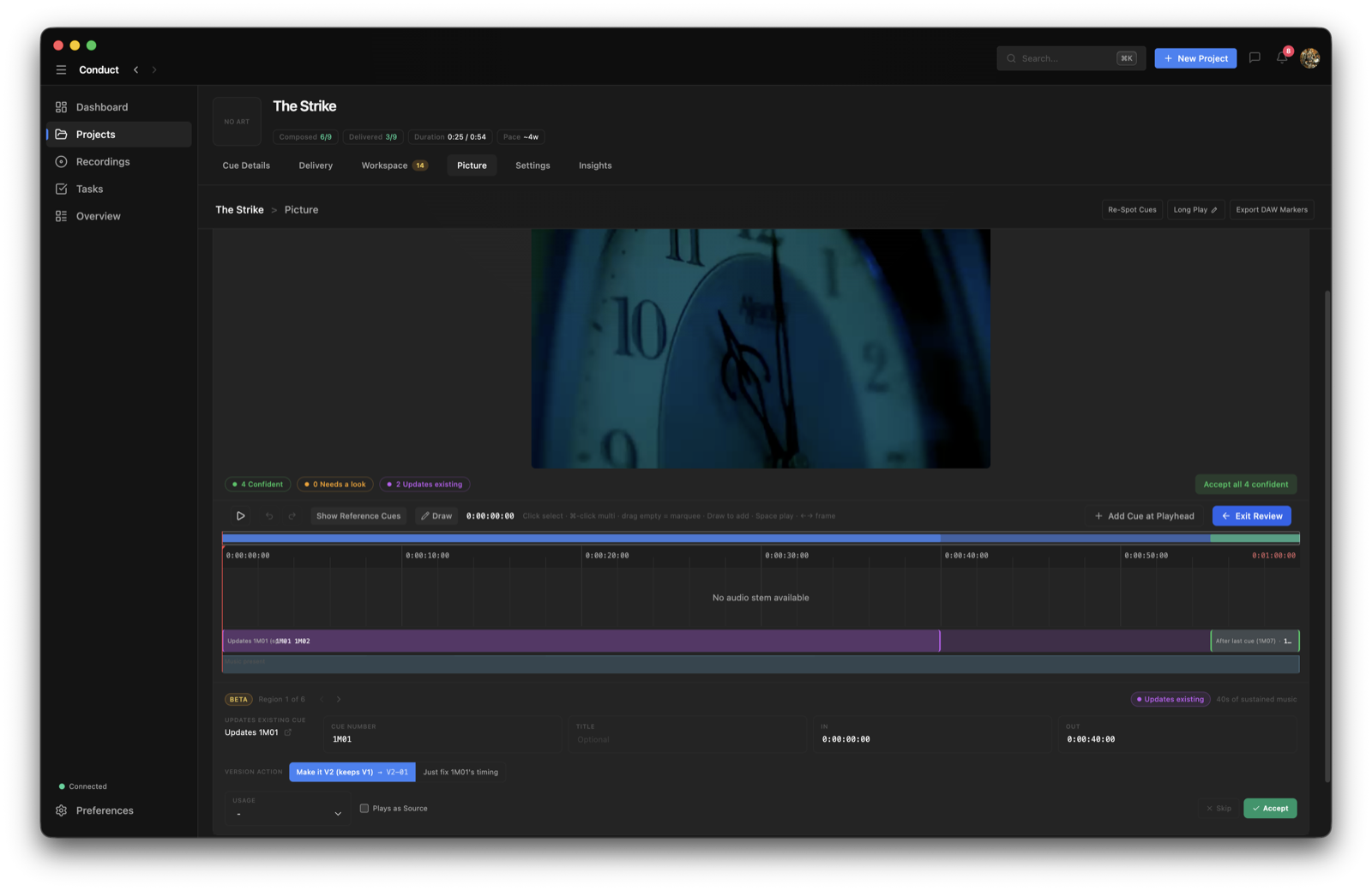
After a scan you review the regions rather than accepting them wholesale. They're colour-coded by how sure AutoSpot is:
- Green — confident. These are usually right and can be accepted in bulk.
- Amber — needs a look. Check the boundaries before you accept.
- Violet — this one updates a cue you already have, rather than creating a new one.
The fast path
- 1
Accept all the confident regions in one go.
That clears the bulk of the work and leaves you the genuinely ambiguous ones.
- 2
Work through the rest one at a time.
Set the cue number, title, and IN/OUT for each, then accept or skip. The arrow keys move between regions.
- 3
Add anything it missed.
Turn on Draw and drag across empty timeline space to create a region by hand.
- 4
Commit to the Cue Log.
Nothing reaches your cue list until you finish the review.
The lane under the timeline
Below the region blocks is a lane showing where music actually plays. A glow there with no block above it is a spot AutoSpot may have missed — a quick way to catch its false negatives.
Common questions
Is my picture uploaded somewhere to be analysed?
No. AutoSpot runs entirely on your own Mac. That's why the model is a download — the analysis happens locally rather than on a server.
How accurate is it?
Good enough to save you a first pass, not good enough to trust blindly — which is why it's marked beta and why the regions are colour-coded by confidence. Green regions are usually right; amber ones want checking. Always review before committing to the Cue Log.
The install seemed to take a very long time.
It's a large model, and after the download finishes there's a real unpacking step that writes a lot of data to disk. The progress bar covers both stages. If you'd rather not wait, you can cancel the install and nothing is left behind.
AutoSpot missed a spot.
Check the lane beneath the regions — a glow there with no region above it flags exactly this. Turn on Draw and drag across the empty space to add the region by hand, then treat it like any other.
Can I use AutoSpot in the browser?
No. It needs the desktop app on an Apple Silicon Mac, because the model runs on your own machine.